How to keep the same model in every AI photo
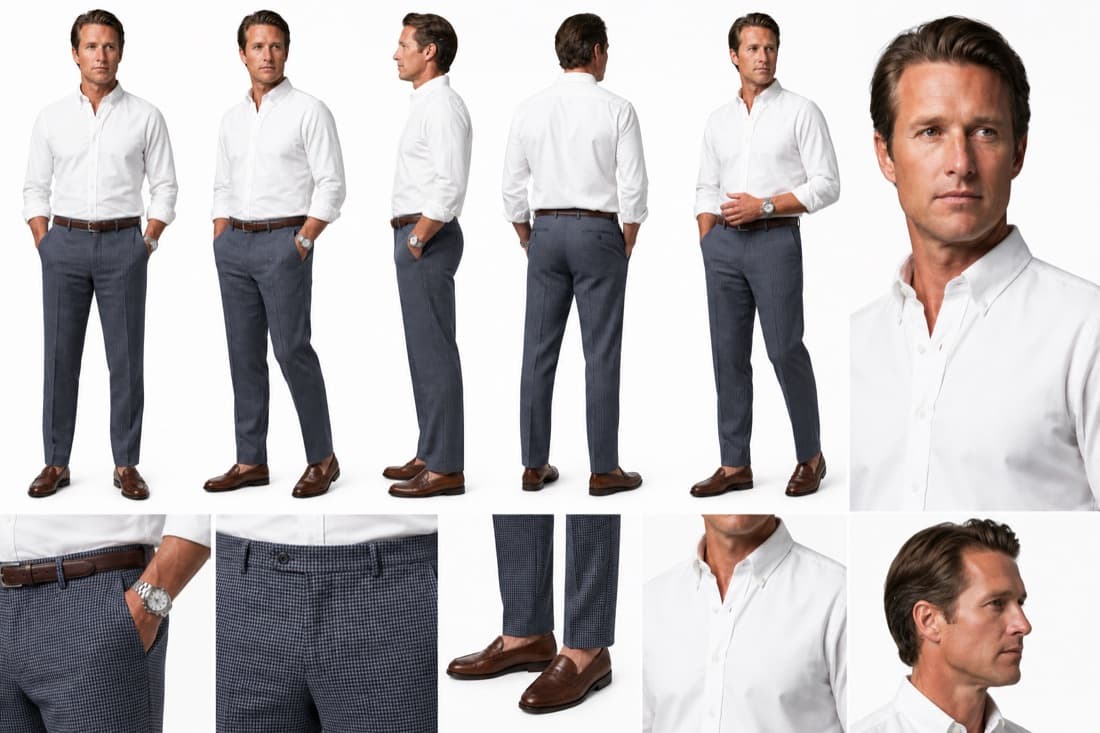
Make a character sheet before any scene: one person shown front, three-quarter, side and back, with face close-ups, on a plain background, wearing your product. Approve it, then send it as the first reference in every shot and repeat the same words for face, hair and wardrobe. When the face drifts, go back to the sheet instead of editing the last image.
Why faces drift between renders
Each render draws the person again from your words and references. Nothing carries over from the last image unless it is in the request, as a reference or earlier in the same chat. OpenAI names this as a limit of its GPT Image models: they may struggle to keep recurring characters consistent across generations. Google’s current models can hold a few people steady when you send their pictures, up to 4 on Nano Banana 2 and up to 5 on Nano Banana Pro.
Small changes add up across a set. Make the jaw a little wider or the eyes a little closer, and the model in photo 8 reads as a sibling of the model in photo 1. On a product page, that looks like two different people wearing your clothes.
What a character sheet is
A character sheet is one image of one person from several angles, made before any scene. Every later photo copies it. A good one has these parts.
- Front, three-quarter, side and back views, full length
- At least two face close-ups, front and profile
- Detail crops of the places the product touches: hands, feet, neckline, waist
- The exact product being sold, worn the way it will be in the photos
- A plain background and soft, even light, so the model learns a person and no scene
- No words, labels or numbers printed anywhere on the image
How to make one
- Describe the person once, in words: age range, build, skin tone, hair color and cut, face shape, any marks. Give them a name; Google’s prompt guide for Nano Banana suggests naming each character so the model can follow them from scene to scene. Reuse the exact words in every prompt.
- Gather references: the product front and back and, if the person is based on a real model, their photos, with their written consent.
- Ask for the sheet on a plain background with the views above, and end the prompt with "no words on the image".
- Render several and pick the one with the most distinct face and the most accurate product. Check hands, ears and the hairline.
- Approve it in writing before any scene is rendered. Every photo after it depends on this one.
- Save it with a name and a version, for example "Mara, v2, approved 24 Sep 2026".
What 20 attempts at one sheet taught us
On our agency’s surf apparel job in 2026, the character sheet took 20 attempts. The whole job used 163 renders for 12 keepers, about 14 per usable photo, the most of the four campaigns in our count of renders per usable photo.
| Attempt | What we tried | Kept? |
|---|---|---|
| 1 | The longest prompt, with 4 references: a detailed list of what must stay identical (face, hair, every seam and logo placement, body proportions) and a front, three-quarter, side and back lineup on a light seamless background | No |
| 2 and 3 | One-line prompts asking to combine the images on one plain background, with an accurate face and accurate clothing | No |
| Later attempts | More references, up to 8: face, body, garment and details | No |
| 20 | 5 references and a four-line prompt | Yes |
combine images provided to create a character sheet with various angles,
his face, body, and clothing must remain absolutely integral and consistent
show closeups for face
NO words on the image
Two lessons came out of it. The kept sheet came from fewer, better-chosen references and a short prompt; the longest prompt and the most references both lost. And the last line was needed because character sheets tend to come back with labels printed on them.
Use the sheet in every shot
Send the approved sheet as the first reference every time, and say what it is. The store photos on our trouser job opened like this, with the sheet as input image 1 and the flat lay of the trousers as input image 2.
This is a photograph of the exact same man as INPUT IMAGE 1, same face, same hair, same skin tone, same build, wearing exactly the same wardrobe head to toe as the character sheet with only the trousers replaced by the product trouser shown in INPUT IMAGE 2.
Then lock whatever is not changing. Describe the wardrobe once and change only the item being sold, as that prompt does. On that job the backdrop and lighting sentences were reused word for word across the store photos, and only the framing and pose sentences changed from photo to photo. OpenAI’s guide for GPT Image 2.5 gives the same advice for characters: repeat their defining details in each new scene, and restate them if the result drifts. For garments seen from behind, see back and side views of clothes.
When the face drifts anyway
| What you see | Likely cause | Fix |
|---|---|---|
| The face changes in wide shots only | The face is small in the frame, so there is little of it to match | Frame tighter, or add a face close-up from the sheet as the second reference |
| The person looks older or younger | Age words missing or changed | Put the same age words in every prompt |
| Hair changes length or parting | Hair described differently from shot to shot | Copy the hair sentence word for word |
| Skin tone shifts | Colored light or a strong grade | Keep the light on skin neutral, state the skin tone, and compare the same cheek area with an eyedropper |
| The likeness fades after several edits | Each edit redraws a little | Go back to the sheet and render fresh; OpenAI notes that repeated edits can change details you meant to keep |
| Two people blend into one | Both in one request without clear roles | Name each person and state which sheet is which |
Consent and look-alikes
A face the model invents can still resemble a real person by chance. Before a campaign, check that your model does not look like a celebrity or someone you know. If the sheet is based on a real model, get written consent that covers AI use, and read AI images of real people and whether AI models need releases. For the casting choices themselves, see how to cast AI models responsibly.
Questions people also ask
- Can we reuse the same AI model across campaigns?
- Yes, if the sheet still matches your product and your look. Keep approved sheets in a library with names and dates, and remake a sheet when the wardrobe or the brand look changes, because a sheet in last season’s clothes teaches the model last season’s clothes.
- How many references should go with the character sheet?
- Only what the shot needs: the sheet first, then the product view for that angle. Google lists up to 6 object references on Nano Banana Pro and 10 on Nano Banana 2, on top of the people. Our kept sheet on the surf job used 5 references in total; the attempts with up to 8 were not kept.
- Does a longer prompt keep the face more consistent?
- It did not for us. The longest prompt we wrote for the surf character sheet, with a detailed list of what had to stay identical, was not kept, and the kept one was four lines. On our trouser job, the kept store photos sent the approved sheet first, as input image 1, and the prompt pointed to it with "same face, same hair, same skin tone, same build".
Where Overs fits
For products that are worn or held, Overs makes a character sheet first and waits for your approval before any scene is made. Every later photo with a person uses that model, and earlier sheets can be reused as a talent library.
Free for 40 photos a month. The AI that makes the photos is billed separately, on your own key, with no markup from Overs.
Sources
- OpenAI: Image generation guide (limitations: consistency)
- OpenAI: Image prompting, GPT Image 2.5 prompting guide (keep a character consistent)
- Google AI for Developers: Nano Banana image generation (characters and objects per request)
- Google DeepMind: How to create effective image prompts with Nano Banana